
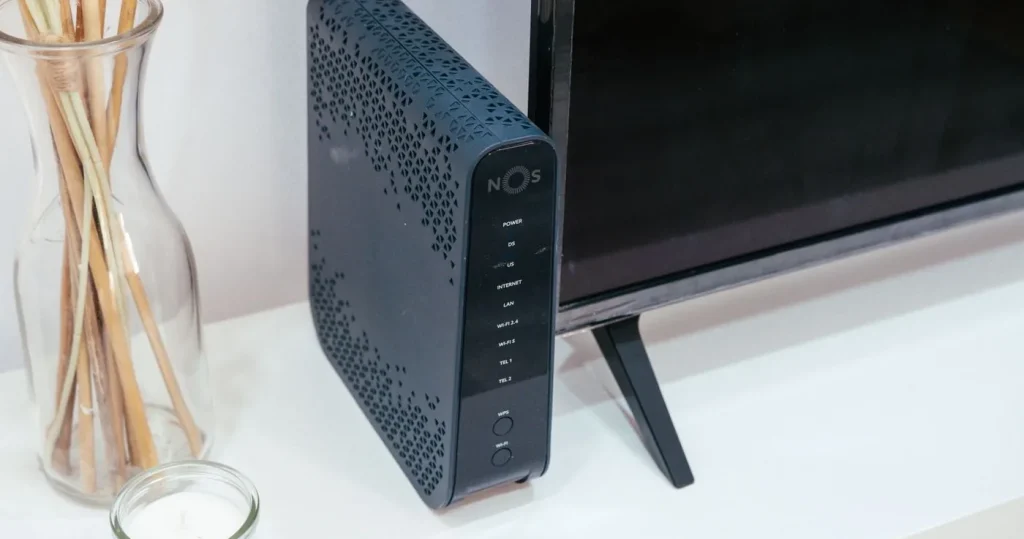
ONT bridge mode is what most people search for when a new mesh system, gaming router or smart home hub sits behind the box their Singapore fibre provider installed and something stops working: port forwarding, a camera app, remote access, or devices that will not show up on the phone. The usual cause is double NAT, two routers each translating addresses, one after the other. This guide explains what the ONT actually is, why the setting you need is usually on an ONR rather than an ONT, what Singtel, StarHub, M1, MyRepublic and ViewQwest say on their own pages about routers, how double NAT breaks smart home devices, how to check for it in two minutes, and which fix suits which home.
What the ONT is, and why ONT bridge mode is usually an ONR question
Fibre reaches a Singapore home at the fibre termination point, the small wall box on the NetLink Trust network; MyRepublic’s own setup diagram labels the chain as “Netlink Trust Termination Point, MyRepublic Modem (ONT) & a router.” The ONT (optical network terminal) converts light into Ethernet. On its own it does no routing and has no WiFi, so it is already, in effect, a bridge: plug one router into it and that router gets the internet connection directly.
The trouble starts with the ONR (optical network router). StarHub’s explainer puts it plainly: “An ONR combines the ONT and a router into one device.” An ONR hands out addresses, runs a firewall and broadcasts WiFi. Plug a second router or a mesh system into it in router mode and you have two routers in a row. So when someone asks for ONT bridge mode, what they almost always need is either bridge mode on the ONR, or their own equipment set to access point mode behind it.
If you want this sorted without touching ISP settings yourself, it is the kind of job a WiFi installation Singapore team handles as part of putting in mesh or wired access points, keeping the telco box as the fibre gateway and making the new equipment sit behind it cleanly.
ONT, ONR and your own router compared
| Box | What it does | Does it route (NAT)? | WiFi? | What to plug in behind it |
|---|---|---|---|---|
| ONT | Converts fibre to Ethernet | No | No | One router or mesh base in router mode |
| ONR | ONT and router in one box | Yes | Yes | Mesh or router in access point mode, unless the ONR is bridged |
| ONR in bridge mode | Acts like an ONT; your router takes over | No | Usually off | Your own router in router mode |
| Your own router | Routing, firewall, WiFi | Yes | Yes | Switches, access points, mesh nodes |
| Mesh or router in access point mode | WiFi only, on the main router’s network | No | Yes | Nothing; it extends the existing network |
The rule that falls out of the table: exactly one box in the home should be routing. Everything else should be a bridge, a switch or an access point.
What double NAT is
NAT (network address translation) lets every device in your home share the one public address your ISP gives you. Your router hands out private addresses inside the home and translates on the way out. The private ranges are fixed by RFC 1918: 10.0.0.0 to 10.255.255.255, 172.16.0.0 to 172.31.255.255, and 192.168.0.0 to 192.168.255.255.
Double NAT is two routers doing this in sequence. The ISP’s ONR gives your mesh base something like 192.168.1.20; the mesh base then gives your phone 192.168.68.15 on a second private network. Traffic out still works, which is why web browsing, streaming and video calls usually seem fine and the problem can go unnoticed for months. Traffic that has to come in, or devices that need to find each other on one network, is where it breaks.
One related case cannot be fixed at home: carrier-grade NAT, where the ISP itself shares one public address between many customers. RFC 6598 reserves 100.64.0.0/10 for it, “to accommodate the needs of Carrier-Grade NAT (CGN) devices.” If your router’s WAN address starts with 100.64 to 100.127, the extra NAT layer is upstream, and only the ISP can change it.
Why double NAT breaks smart home devices
Most smart home apps connect out to a cloud service, and outgoing connections survive double NAT. What fails falls into four groups:
- Port forwarding and UPnP. A rule on your own router forwards to nothing, because the ONR in front of it never passes the traffic on. That affects an NVR or camera you reach by address, a Home Assistant server, a game console’s NAT type, or a VPN server at home. StarHub’s article lists the same symptoms: “issues with gaming NAT type, VPN connections, and port forwarding.”
- Devices split across two networks. The most common smart home failure. Some devices join the ONR’s WiFi, others the mesh WiFi, and they end up on two separate private networks. Local discovery does not cross a router, so the phone on the mesh cannot see the speaker, TV or bridge on the ONR side; casting, local Matter or HomeKit control and brand apps that pair locally all look broken.
- Local control quietly falling back to the cloud. Google describes Matter devices as “designed to work locally over your existing home network.” Put the controller and the device on different routed networks and the local path is gone; things become slower, or stop when the internet blips.
- Peer-to-peer video. Some cameras and doorbells try a direct connection first and fall back to a cloud relay; behind two NATs the direct path fails more often, so live view is slower to open.
Apple Home and Google Home remote access normally work through their own cloud and a home hub, so double NAT alone rarely breaks them; the split network does. If you are planning the whole network rather than patching one box, our guide on how to set up a home network walks through the layout from the fibre point outwards.
How to check for double NAT in two minutes
Method 1: read your router’s WAN address
Open your own router or mesh app and find the WAN or Internet IP address. If it is in one of the RFC 1918 private ranges above (192.168.x.x, 10.x.x.x or 172.16.x.x to 172.31.x.x), another router is in front of it: double NAT. If it is a public address, your router is talking to the ISP directly. If it starts 100.64 to 100.127, see the carrier-grade NAT note above.
Method 2: traceroute from a computer
- Connect a laptop to the WiFi you normally use.
- On Windows, open Command Prompt and type tracert -d 8.8.8.8. On a Mac, open Terminal and type traceroute -n 8.8.8.8.
- Read the first few hops. One private address followed by public ones is a single NAT. Two different private addresses in a row (for example 192.168.68.1 then 192.168.1.254) means two routers: double NAT.
Method 3: count the WiFi names
If the ONR’s own WiFi is still broadcasting alongside your mesh WiFi, and some devices sit on each, you have the split-network problem even before you check addresses.
ONT bridge mode and Singapore ISPs: what each one says
Bridge support is the ISP’s decision, not yours, and it changes with plans and hardware. This is what each provider’s own pages say, read on 20 October 2026; where a page is silent, we say so rather than guess.
- Singtel: its support page says “the primary connection of the Singtel Fibre Broadband network is enabled via the Optical Network Router.” We found no Singtel page offering bridge mode. Singapore tech blogger Lester Chan, writing on 28 July 2025 about the ZTE ONR on Singtel’s 10Gbps plan, reports that Singtel once supported bridging on an earlier bundle but “has stopped allowing bridging on its ONR”, and that his workaround is unofficial with “no promises” it survives firmware updates. We would not rely on an unofficial method in a home that depends on its network.
- StarHub: its editorial “ONT vs ONR: What’s the Difference?” (15 April 2026) advises “Set the ONR to bridge mode (if your ISP supports it)”, or setting your own router to access point mode instead. It does not state which StarHub plans include an ONR or allow bridging; ask StarHub for your plan.
- M1: its fibre FAQ says “You can connect your current wireless router to the Optical Network Terminal (ONT)”, asks you to confirm the router “supports a WAN input of at least 1 Gigabit”, and notes that “You cannot switch between an XGSPON ONT plan and an XGSPON ONR plan”. So whether you have an ONT or an ONR is fixed by the plan you signed.
- MyRepublic: its support page says its 10Gbps plans are offered “with or without bundled routers” and that customers can “use their own routers that can support 10Gbps speed.” Its setup diagram shows a separate ONT and router.
- ViewQwest: its fibre FAQ says you “can choose a router at a discount” on 10Gbps plans; we found nothing on its pages about bridge mode or own-router settings. Ask ViewQwest before you buy.
Whatever the ISP, keep the ISP’s router or ONR, its labels and its admin details safe: support lines generally troubleshoot from their own box.
ONT bridge mode or access point mode: choosing the fix
Three clean fixes, in the order we would try them in a typical HDB flat or condo:
- Put your mesh or router in access point mode behind the ONR. The ONR stays the only router, your mesh provides the WiFi, and everything shares one network. It needs no ISP cooperation and survives ISP firmware updates. You lose some of the mesh app’s router features (its own parental controls, port forwarding, and in some systems advanced security), because routing stays with the ONR.
- Bridge the ONR, if your ISP officially supports it on your plan. Your own router then does everything, including port forwarding and VPN. Worth it if you depend on those features.
- Be on an ONT plan and use your own router. The cleanest arrangement for an advanced home network, but it is a plan choice; on M1, as quoted above, you cannot simply switch between ONT and ONR plans.
A fourth option, DMZ or “exposed host” on the ONR pointed at your own router, passes incoming traffic through and helps with port forwarding, but both routers still run NAT and the split-network problem remains if anything joins the ONR’s WiFi. Treat it as a patch.
Setting up a mesh system behind an ISP router without double NAT
- Note the ONR’s WiFi name and admin address, then connect the mesh base to one of its LAN ports by Ethernet.
- In the mesh app, choose access point mode (some brands call it bridge mode) at setup, or switch to it under advanced settings.
- Decide on the ONR’s own WiFi: turn it off, or give it the same name and password only if the ISP allows and you understand roaming between unrelated systems is not seamless. Off is simpler.
- Re-join every smart device to the one WiFi name that remains. WiFi smart switches, plugs and cameras will need re-pairing if the name or password changed.
- Run the WAN and traceroute checks again: one private hop, then public.
On a long condo or multi-storey home, wired backhaul between nodes matters more than the router brand; our comparison of mesh WiFi vs an extender explains why an extender adds yet another network name and makes the split-network problem worse.
Smart home devices to re-check after the fix
- Hubs and bridges (Zigbee hubs, Matter controllers, Thread border routers): make sure they and the phones that control them sit on the same network.
- 2.4 GHz-only devices: if you split bands to pair them, put the names back afterwards.
- Cameras and NVRs: confirm live view opens quickly from outside the home; remove old port-forward rules you no longer need.
- Casting and speakers: confirm the TV and speakers appear on every phone.
- Anything with a fixed address: a server or NVR given a reserved address on the old network needs one on the new one.
For the protocol side of local control, our explainer on what Matter is covers why devices on one network behave better than devices split across two.
Frequently asked questions
What is ONT bridge mode?
Strictly, an ONT already behaves as a bridge: it converts fibre to Ethernet and does no routing. People usually mean bridge mode on an ONR, the ISP box that combines the ONT with a router, which turns off its routing so your own router takes over.
Is double NAT bad for a Singapore home network?
For browsing and streaming it is usually harmless. It breaks port forwarding, UPnP, some gaming and VPN setups, and local control when smart devices end up on two different networks.
How do I know if I have double NAT?
Check your own router’s WAN IP address: a private address such as 192.168.x.x or 10.x.x.x means another router sits in front. A traceroute that shows two private hops before the public internet confirms it.
Can I put my Singtel ONR in bridge mode?
We found no Singtel page offering it. A Singapore tech blog reported in July 2025 that Singtel had stopped allowing bridging on its ONR and that the workaround is unofficial. Access point mode on your own equipment is the safer route.
Should I use bridge mode or access point mode for my mesh WiFi?
Access point mode on the mesh if you want the ISP box to stay in charge and need no port forwarding; bridge mode on the ISP box, where officially supported, if your own router must handle port forwarding, VPN and advanced features.
Will fixing double NAT make my internet faster?
Rarely by itself. It fixes connections that were failing, not raw speed. Slow WiFi in far rooms is a coverage problem, solved by placing mesh nodes or wired access points properly.
One router, one network, every room covered
Roen surveys the home, keeps your telco box as the fibre gateway, and installs mesh or wired access points behind it on a single network, with smart home devices re-joined and checked before handover.